


- May 28
- 1 min read
ISSUE: Customer wants to add funds to a gift card, increasing the balance available on the card.
FIX: Process a payment and apply it to the gift card. Follow the steps below to add funds to a gift card:
1. Start a new ticket
2. Enter customer for the ticket
3. Press a pay code button for chosen method of payment (Cash is used in this example)

4. The ticket shows Change due in the amount of the payment.

5. Click the GIFT CARD payment button, then scan or manually enter the Gift Card number.

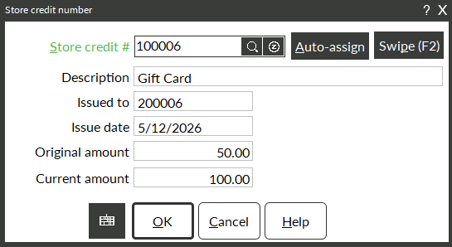
6. Press OK to accept this Gift Card, then press COMPLETE to finish the transaction.
7. The receipt will show the NEW balance for the gift card.

* NOTE: Setup Required
The Gift Card Code must be set to ‘Create as a store credit’
Setup \System\ Gift Card Codes

The Touchscreen pay code button must point to a Store Credit pay code.
Setup\ Point of Sale \ Touchcode –

